
Secure Patient Messaging
Secure patient messages that you control
 Patient Messaging
Deliver secure messages to one patient, or all patients at once, quickly, easily, and on your terms. Accuro Engage Patient Messaging saves your clinic time and helps you—and more than 5,500 other Accuro Providers—deliver care that works better for everyone.


Secure one-on-one messaging
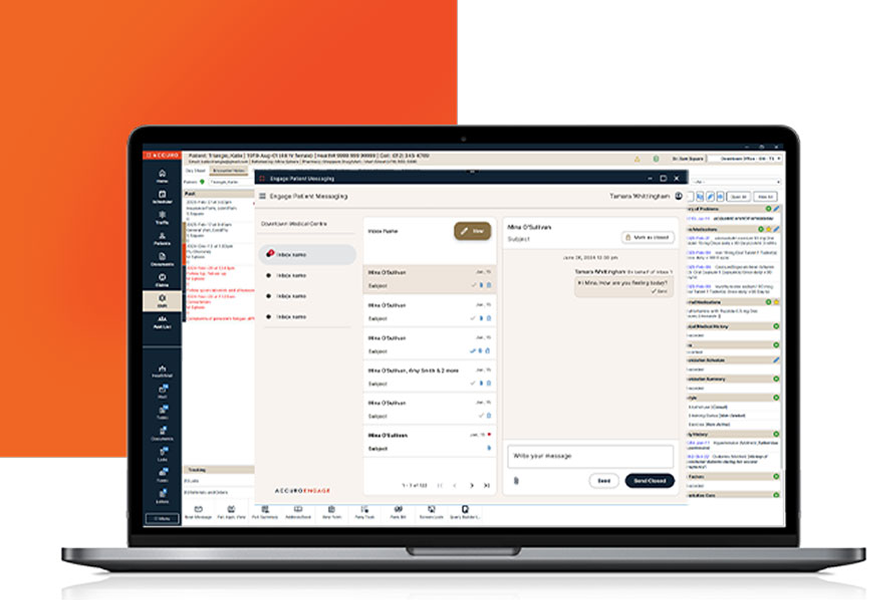
Connect with patients for a quick check-in, ask about symptoms, or share test results and documents right from the chart when an in-person visit isn’t needed.

Conversation control
Keep your inbox organized and minimize distractions by closing the message thread so patients can no longer respond.

No-reply mass messaging
Using Query Builder, send a ‘no-reply’ message to notify all patients when the clinic will be closed, a provider will be away, or when new services are offered.


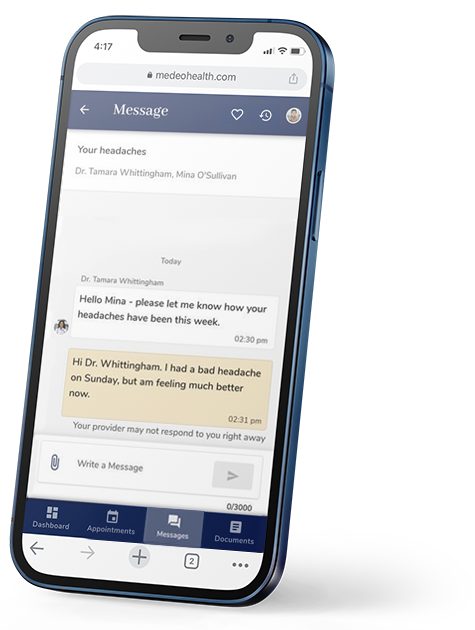
How Patient Messaging works for your patients.
- Send a Patient Message from Accuro to your patient.
- Your patient receives an email notification instructing them to log in and view the message in Medeo Patient app. Note: If they never created a Medeo Patient account, they will be prompted to do so.
- If you sent your Patient Message as open, your patients will be able to respond to you through the Medeo Patient app which will appear in your Patient Messaging messages tab.
For more information on what your patients will see, visit
What features does Patient Messaging include?
- PIPEDA Approved – Your messages are safe
- Send documents and files
- Send lab results
- Send pictures
- Send messages
- Delegation feature
- Mass messaging
- Ability to close message thread
- Ability to send closed message
- Ability to save messages within patient chart
- Integrated with Accuro
- Ability to sort and filter messages
- Patient receives an email notification when message arrives
- Ability to delete a message
- Read receipts
- Ability to print messages
- Syncing messages
- Group messaging
 Common questions asked about Patient Messaging